 ultimate-guide
The Safe Guide to Buying Government Surplus Laptops
Last Updated: October 30, 2026
Quick Summary
Buying surplus laptops safely means verifying the seller and domain, reading the lot description for exclusions, and reviewing the test report before you bid. Score each lot on seller legitimacy, test evidence, completeness, and logistics, then set your ceiling from the total cost, not the winning bid.
- Confirm the listing domain matches the agency's own surplus-property page and never pay by wire, gift card, or payment app.
- Treat a listing that only says powers on as untested for ports, radios, battery, and storage.
- As-is means the seller makes no functional guarantee, and government surplus return policies are usually narrow or nonexistent.
- Ask which sanitization method and standard the seller followed, such as NIST SP 800-88, and verify the drive state in BIOS on arrival.
- Add the buyer's premium, sales tax, charger, storage or OS, and shipping to your bid before setting a ceiling.
Table of Contents
- Why Government Surplus Laptops Are Worth the Risk
- Your Government Surplus Auction Buyer Checklist
- Step 1: Verify the seller and the domain
- Step 2: Read the lot description for what is excluded
- Step 3: Locate the test report and read which components were tested
- Step 4: Run the component-level inspection protocol
- Step 5: Score the risk before you bid
- Step 6: Calculate the total cost and confirm logistics
- Reading Government Surplus Computer Condition Codes
- Government Surplus Laptop Data Security: What Wiping Really Means
- The Government Surplus Laptop Return Policy Reality
- What a Surplus Laptop Really Costs: Bid Math and Total Ownership
- Register at KVSAuctions.com and Bid With a Plan
- Frequently Asked Questions
Why Government Surplus Laptops Are Worth the Risk
Buying government surplus laptops safely starts with understanding what you are actually bidding on. These machines come from agencies that refresh fleets on fixed schedules, so the hardware is usually a few years old but was originally bought under procurement contracts that favored durable business models. Future Market Insights' refurbished computer market analysis projects refurbished laptops to account for 74.0% of the refurbished computer and laptop market in 2026, a signal that the secondary market is now mainstream rather than a fringe hobby.
At KVSAuctions.com, some listings include test reports, which changes the math. The savings can be real, and so is the risk. Below, we walk through the checklist, the condition codes, the data security question, and the bid math that separates a good deal from an expensive lesson.
Your Government Surplus Auction Buyer Checklist
A government surplus auction buyer checklist is a pre-bid screening tool: it forces you to verify the seller, the lot contents, the test evidence, and the total cost before you commit a dollar. The version below adds a risk score and a component-level inspection protocol, so you can decide whether a lot is worth inspecting or bidding on.
Step 1: Verify the seller and the domain
Confirm whether the auction is run by the agency itself, a contracted auctioneer, or a reseller. Check that the domain in the listing matches the domain named in the agency's own surplus-property page, and that payment instructions arrive through the platform's messaging system rather than a direct email. A common pattern in surplus fraud is a spoofed listing that copies real photos but redirects payment to a personal account.
Step 2: Read the lot description for what is excluded
Quantity, model, and exclusions matter more than the headline. Look specifically for the words "no charger," "no drive," "no OS," "battery not tested," and "parts only." A lot of laptops with no chargers is a different purchase than a lot with chargers, so factor the cost of a replacement charger into your bid. Multiply that by the lot size before you bid.
Step 3: Locate the test report and read which components were tested
A listing that says "tested and working" tells you almost nothing until you see which ports, radios, and drives were actually exercised. A useful test report names the model, the BIOS or firmware version, the storage type and capacity, the battery design capacity and current capacity, and the specific ports tested (USB-A, USB-C, HDMI, Ethernet, headphone). If the report only says "powers on," treat the unit as untested for everything else.
Step 4: Run the component-level inspection protocol
When inspection is allowed before bidding, and many agency auctions hold a preview day, work through this sequence in order, because each step depends on the one before it:
- Power and POST: Boot to BIOS/UEFI. Confirm the model string matches the listing, the RAM count matches, and no BIOS password is set. A locked BIOS is a hard stop unless you can clear it.
- Battery health: In BIOS or the OS battery report, compare design capacity to full-charge capacity. A battery reporting well below its design capacity may need replacement for all-day use.
- Screen: Display a solid white, then solid black, image full-screen. Look for dead pixels, pressure marks, and backlight bleed along the edges. Check the hinge for wobble.
If you cannot inspect in person, ask the seller for photos of the BIOS screen, the battery report, and the port row. Sellers who document their process will provide them; sellers who will not are telling you something.
Step 5: Score the risk before you bid
Assign each lot a simple red/yellow/green score across four dimensions: seller legitimacy, test evidence, completeness (charger, drive, OS, battery), and pickup or shipping feasibility. A lot that is green on three and red on one is usually biddable with a lower ceiling. A lot that is red on seller legitimacy or test evidence is not biddable at any price.
Step 6: Calculate the total cost and confirm logistics
Add the buyer's premium, sales tax, pickup or shipping, and any parts you must supply. Confirm the pickup window and whether shipping is offered at all, pickup-only lots on heavy equipment can erase the savings. Our guide to spotting hidden auction fees shows how to build this calculation before you bid.
A common mistake is skipping the test report review. Listings that omit a test report deserve extra scrutiny before you bid.
Reading Government Surplus Computer Condition Codes
Government surplus computer condition codes describe cosmetic and functional state, but the definitions are not standardized across sellers, so the same label can mean different things on two platforms. Treat every code as a starting point and the test report as the evidence.
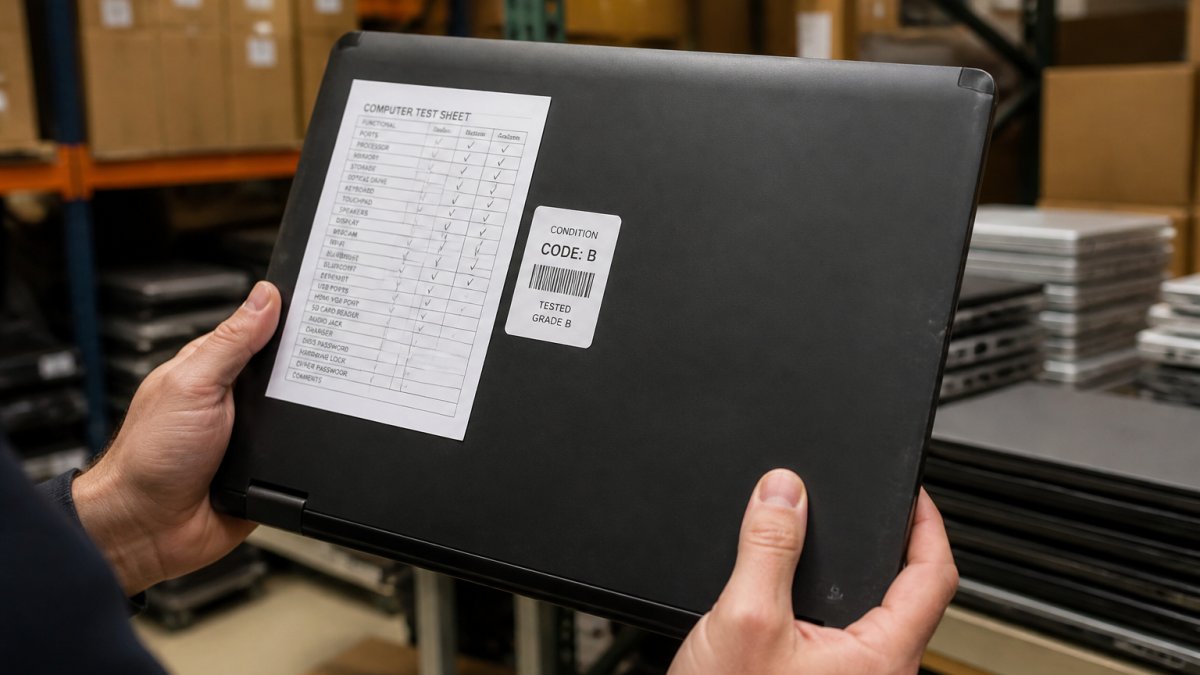
Common labels you will encounter include new condition, unused, used condition, ex-government, and off-lease. For a step-by-step method of interpreting grades and test documentation, see our guide on how to verify refurbished laptop condition.
Government Surplus Laptop Data Security: What Wiping Really Means
Government surplus laptop data security hinges on one question: who removed the previous user's data, and can they prove it? A machine that boots to a fresh Windows installation has had its drive addressed, but that is not the same as certified sanitization. The safety question that matters most is proof, not the promise of a wipe, but evidence of the method and the standard it followed.
Know the difference between a reset and a sanitization
A factory reset or a reinstall removes the file system's pointers to data but can leave recoverable traces on some drive types, particularly older spinning disks and some solid-state drives without encryption enabled. A full-drive overwrite, a cryptographic erase on a self-encrypting drive, or physical removal and destruction of the drive are stronger. When a listing says "no drive" or "no OS," the storage question is settled by absence, which is often the safest purchase for anyone handling sensitive work, you supply a new drive and control the entire software stack.
Lenovo ThinkPad T14 Gen 2 - Intel I5-1145G7, 16GB RAM, 256GB SSD, NO OS →
Ask for the method and the standard
Ask the seller which sanitization method was used and which standard it followed. Buyers can ask sellers which sanitization guidance they followed, such as NIST SP 800-88, the federal guidance on media sanitization. A seller who can name the method, the standard, and the date of sanitization is giving you something you can audit. Our parent company's R2V3 certified electronics recycling standard certification is the kind of chain-of-custody evidence worth checking for.
Verify on arrival before you connect it to anything
Do not join a newly arrived surplus laptop to your network or sign into a personal account until you have verified the storage state. Boot to BIOS/UEFI and confirm the drive serial and model match what the listing described. If the unit shipped with a drive, check whether the drive shows signs of a prior OS install, a recovery partition, an OEM activation marker, or a user profile directory, before you reinstall.
Reinstall the operating system yourself
For any machine you intend to use for work or personal accounts, a clean install from official installation media is the safest path. Do not rely on a recovery image supplied by the seller unless you can verify its source. During setup, choose to erase the drive rather than keep existing files, and enable full-disk encryption (BitLocker on Windows Pro, FileVault on macOS) before you sign into any account.
Handle residual organizational data carefully
If you find residual organizational data on a surplus machine, a saved browser profile, a document folder, a cached credential, do not open, copy, or share it. Document what you found, photograph the screen if needed, and contact the seller or the agency's surplus property office. Most public agencies have a process for reporting recovered data, and reporting it protects you as much as it protects the prior user.
The Government Surplus Laptop Return Policy Reality
Government surplus laptop return policies are usually narrow or nonexistent, and buyers who assume otherwise get burned. The General Services Administration's guidance on purchasing surplus property states plainly that it does not guarantee the condition of sale items, and state surplus programs commonly sell computers as-is with no claim that they will work.
That does not mean you have no recourse. If a unit arrives dead, our walkthrough on how to get a refund on an auction covers eligibility, request timelines, and escalation. For a fuller picture of the tradeoffs, read about the risks of buying as-is electronics.
What a Surplus Laptop Really Costs: Bid Math and Total Ownership
The winning bid is not the full price. Total cost can include the bid, sales tax, pickup or shipping, and any parts you must add.
| Cost Component | What to Estimate | Why It Matters |
|---|---|---|
| Winning bid | Your maximum, set in advance | Emotional bidding inflates this fast |
| Buyer's premium | A percentage added at checkout | Varies by platform and lot type |
| Sales tax | Applied per jurisdiction | Easy to forget on out-of-state lots |
| Charger | Often excluded | A replacement adds real cost |
| Storage or OS | Sometimes excluded | Licensing and install time |
| Shipping or fuel | Pickup-only lots | Can exceed the bid on heavy lots |
Our guide to spotting hidden auction fees shows how to build this calculation before you bid. Set your ceiling from the total, not the bid number.
Register at KVSAuctions.com and Bid With a Plan
A plan beats a bargain every time. KVSAuctions.com lists government surplus and refurbished electronics across auction, fixed-price, and classified formats, backed by our parent company, KVS Computers, which is R2V3 certified for electronics recycling. Some listings are for laptops without an operating system, and others include Windows 11 already installed.
Register, set a total-cost ceiling, and bid only what the test report justifies.
Frequently Asked Questions
Is it safe to buy a government surplus laptop?
It can be safe if you verify the seller and read the listing terms first. Government surplus sales commonly do not guarantee the condition of items, and computers are often sold as-is. Treat every listing as untested until a test report proves otherwise. Check the condition description, confirm whether a charger and operating system are included, and budget for a replacement battery. Buying from a seller that publishes test reports and grading removes most of the guesswork.
How can I check a surplus laptop's condition before bidding?
Use the government surplus auction buyer checklist: read the full listing, open any attached test report, confirm battery health figures, and note what is missing. On KVSAuctions.com, listings state exactly what was tested. One Lenovo ThinkPad T14 Gen 2 listing, for example, reports failed USB ports, microphone, and Wi-Fi, plus 85% battery capacity, and sells for $190. If a listing has no test report and no photos of the actual unit, assume the worst and bid accordingly or skip it.
Are government surplus laptops wiped of their data?
Do not assume it. Government surplus laptop data security depends on the seller, and practices vary. Some agencies wipe drives before sale; others sell machines with drives removed entirely, as several KVSAuctions.com listings do. If a drive is included, plan to reinstall the operating system yourself and overwrite the disk before storing anything personal. Ask the seller for written confirmation of data wiping, and treat any drive that arrives with an existing profile as a security risk, not a bonus.
Can I return a laptop bought at a government surplus auction?
Government surplus sales are often final, and items are commonly sold as-is without a guarantee of condition. Before bidding, read the auction terms for any dispute window, and photograph the box as you open it. On KVSAuctions.com, check each listing's stated terms and the attached test report so you know what you are accepting. If recourse matters to you, buy from a seller that documents condition and honors a stated policy.
What extra costs should I expect when buying a surplus laptop?
The bid price is rarely the full cost. Add buyer's premiums where charged, sales tax, shipping or in-person pickup travel, and a charger if none is included. Many surplus units ship without an operating system, so budget for a Windows license, and expect a battery replacement on older machines. A $180 lot of five Dell Latitude 3380s with Windows 11 Pro and chargers included is a very different deal from a $200 Panasonic Toughbook with no drive, no OS, and no charger.
The difference between a smart surplus purchase and a costly mistake is preparation, not luck. KVSAuctions.com gives you test reports, varied listing formats, and a certified recycling backbone so you can bid with evidence instead of hope. Get started with KVSAuctions.com and turn your next surplus bid into working hardware.