 How-to
How to Buy Reliable Used Business Computers
Last Updated: November 22, 2026
Quick Summary
To buy reliable used business computers, match the specifications to your work, confirm the operating system and model, and read the test report before bidding. Business-class machines with solid-state drives and tested components are usually the safest choice, and refurbished units can cost 40% to 70% less than new retail systems.
- Refurbished systems can cost 40% to 70% less than new retail systems, according to the article's cited buyer's guide.
- Business-class machines are usually the safest starting point because they tend to be built for longer use.
- Confirm the exact model number and read the test report before placing any bid.
- Verify the machine can run a currently supported operating system, since unsupported machines cannot receive security updates.
- Compare total cost of ownership, including shipping, batteries, licensing and repairs, not just the bid price.
Table of Contents
- What Makes a Used Business Computer Worth Buying
- Where to Buy Used Business Laptops and Refurbished Computers
- How to Buy Reliable Used Business Computers Online
- Checking Specifications, Condition and Service History
- Best Used Laptops to Buy in 2026 for Business Use
- Reading Warranties, Return Policies and Test Reports
- Planning a Bulk Order for Your Business Fleet
- Placing Your First Bid on KVSAuctions.com
- Frequently Asked Questions
What Makes a Used Business Computer Worth Buying
A used business computer is worth buying when it does the job you need at a price that beats new hardware. Refurbished systems can cost 40% to 70% less than new retail systems, according to Alamo Geeks' 2026 refurbished computer buyer's guide.
The catch is that price alone tells you very little. A cheap machine with a failing battery, a slow hard drive or no operating system can cost more in time than it saved in money. This guide shows you how to judge a used business computer before you bid.
Business-class machines are usually the safest starting point. They tend to be built for longer use, with better keyboards, sturdier chassis and easier access to memory and storage. Look for a model that still receives driver support and can run a current operating system.
Where to Buy Used Business Laptops and Refurbished Computers
You can buy used business computers from several sources, and each carries different risks. Private sellers on open marketplaces can offer strong prices, but condition and testing are often unclear. Wirecutter's guide to shopping for a used laptop or desktop PC cautions against open classifieds for used PCs, while noting that good deals are possible.
At KVSAuctions.com, listings state the hardware specs and whether an operating system is installed. Read those details before you place a bid.
| Source | Typical strength | Main risk | Best for |
|---|---|---|---|
| Open marketplaces | Lowest prices | Unclear testing and condition | Buyers who can inspect in person |
| Refurbishers | Tested hardware, clear grades | Higher prices than private sales | Office and daily work |
| Auction platforms | Wide selection, competitive bids | Items sold as-is, variable detail | Technically skilled buyers and resellers |
How to Buy Reliable Used Business Computers Online
Buying online means you cannot touch the machine before it arrives. Start by confirming the exact model number and the specifications in the listing. Then check whether the seller provides a test report, and read it rather than skimming it.
Compare the listing photos with the written condition grade. If the photos show heavy wear but the grade claims excellent condition, ask questions before you bid.
Finally, confirm what you are actually buying. Some listings include a charger and a fresh operating system, while others do not. A missing charger or a missing operating system changes the total cost.
Checking Specifications, Condition and Service History
Before you commit to a used business computer, match its specifications to the work you plan to do, and then verify the things a business buyer cannot afford to guess at. A machine for email, documents and web browsing has different needs from one running design software or large spreadsheets. Check the model, processor, memory, storage, battery and ports against your requirements, then run the business-specific checks below.

Processor, Memory and Storage Checks
The processor sets the ceiling on performance for years to come. Confirm the exact processor model, not just the family name, since processor generations differ in efficiency and supported software.
Memory matters just as much. Check whether the memory is soldered or upgradeable, since that affects your future options and your total cost of ownership.
Storage deserves close attention. A solid-state drive makes a used computer feel far faster than an older hard drive. Check the drive type and capacity in the listing, and plan for a fresh operating system install and data wipe if the seller has not provided one. For a step-by-step approach, see how to test used computer hardware before you buy.
Battery, Ports and Physical Wear
Battery health is one of the most common surprises with used laptops. Treat any battery figure as a guide, since a used battery's real condition cannot be guaranteed. For a fleet, consider budgeting for battery replacement, especially where the test report shows reduced health.
Check the ports against the devices you use every day. If you need USB, HDMI or a card reader, confirm that each one is listed as working. Physical wear is normal on a used machine, but it should match the grade. Look for scratches, sticker residue, dents and hinge wear in the photos.
Business Verification Checklist
Use this checklist before you bid on any machine destined for business use:
- Exact model and service tag: Confirm the model number and, where available, the manufacturer's service tag or serial so you can look up warranty status and driver support.
- Operating system support: Verify the machine can run a currently supported version of Windows or your chosen OS, and check the manufacturer's end-of-support date for that model. A machine that cannot receive security updates is a liability, not a bargain (Windows 10 support has ended on October 14, 2025).
- Firmware and BIOS lock status: Ask whether the BIOS/UEFI is password-locked or has a computrace/absolute-persistence module enabled. A locked firmware can block OS installation and device management enrollment.
- Data sanitization evidence: Confirm the prior owner's data has been erased. A seller who provides a clean-install report or confirms a drive wipe is safer than one who ships a drive with the previous user's profile intact.
- Test report specifics: Read functional grades for ports, microphone, Wi-Fi, camera and keyboard. A report that names a failed component gives you a fair basis for a lower bid or a decision to pass.
- Charger and accessories: Confirm whether a charger, dock or monitor is included. A missing charger changes the total cost and may indicate the unit was separated from its original kit.
Best Used Laptops to Buy in 2026 for Business Use
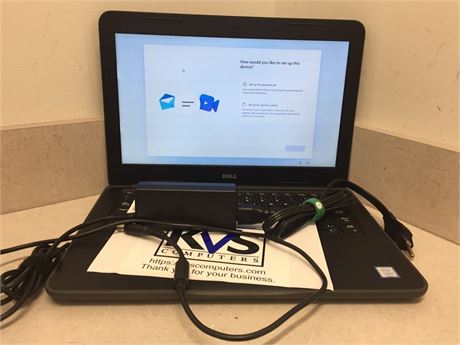
A tested business laptop with 8 gigabytes of memory and a solid-state drive is a reasonable starting point for many small businesses. The Dell Latitude 3380 is a good example. Its listing describes an Intel Core i5-7200U processor, 8 gigabytes of memory, a 256 gigabyte SATA SSD and a fresh Windows 11 Professional installation, with a charger included and a stress test reported as clean. [Dell Latitude 3380 listing | kvsauctions.com]
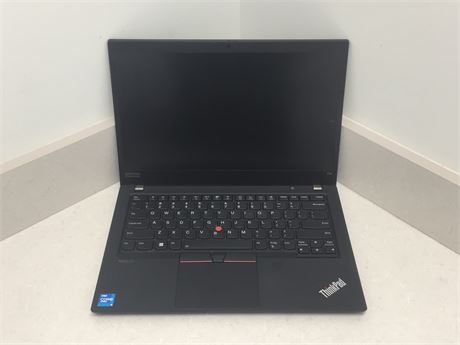
If you want more memory headroom and are comfortable installing your own operating system, the Lenovo ThinkPad T14 Gen 2 is worth a look. Its listing shows an Intel Core i5-1145G7 processor, 16 gigabytes of memory and a 256 gigabyte SSD.
Skip any machine whose listing does not match your needs.
Reading Warranties, Return Policies and Test Reports
Warranties on used and refurbished equipment vary widely, so read the terms before you bid. Find out how long coverage lasts, what it includes and when the clock starts. A short warranty on a tested machine can still be valuable, but only if you understand what it covers.
Test reports are useful evidence of condition. Read the functional grades, the battery figure and any notes about failed components. A report that names a problem gives you a fair basis for a lower bid or a decision to pass.
Check the return policy before you bid, not after you win. Check in advance whether returns are possible, since return terms for listings are not verified here.
Planning a Bulk Order for Your Business Fleet
Buying several used computers at once can cut costs, but it also multiplies the risk. Treating a used-computer purchase like a small procurement project can help: standardize, verify compatibility, document assets, and calculate total cost of ownership before you commit.
Standardize on One or Two Models
Standardize on one or two models so your team has consistent hardware, software and spare parts. Mixed models make support harder and drive up the time spent troubleshooting. Confirm the quantity available of the same model and configuration before you bid. Ask for the quantity available before you bid, and confirm whether the units share the same processor, memory and storage configuration.
Verify Business Compatibility Before You Buy
Check compatibility with the software, docks, monitors, networks and device-management tools you already use. Confirm the machine supports your required operating system version and can enroll in your device-management platform. Verify dock and monitor connections (USB-C, DisplayPort, HDMI) match your existing peripherals, and confirm Wi-Fi standards are adequate for your network.
Build a Total Cost of Ownership Comparison
Compare purchase price with shipping, taxes, upgrades, batteries, repairs, licensing and warranty costs to identify the genuinely economical option. A used machine at a low bid price can cost more over three years than a slightly pricier tested unit once you add a replacement battery, an OS license, a charger and repair time. Build a simple per-unit total: bid price + shipping + tax + any missing accessories + expected battery replacement + OS license (if not included) + estimated repair reserve. Compare that total against a new or refurbished unit with a warranty.
Test One Unit, Then Scale
Consider testing one unit from a batch before placing a bulk order. Run your usual software, check the ports and monitor the battery over several days. If that unit performs well, the rest of the order is more likely to do the same. Document the test results so you have a baseline for the batch.
Set Up Asset Records and Deployment Planning
Plan for asset records from day one. Record the model, service tag or serial number, configuration, purchase date and warranty status for each unit. This supports warranty claims, repairs and eventual resale or disposal. Budget for setup, not just the purchase price, since operating system installation and data wiping add cost and time. Factor those into your total before you compare a used fleet with new machines.
Placing Your First Bid on KVSAuctions.com
Placing your first bid is simpler than most buyers expect. Register, find a listing that matches your specifications, and read the full description before you bid. Set a maximum you are willing to pay, including any fees, and stick to it.
Bidding is designed to be straightforward for first-time buyers. Once you win, confirm the details against the listing and follow the instructions on the auction page.
Register at KVSAuctions.com to browse current auctions and find a machine that fits your work.
Frequently Asked Questions
Where is the best place to buy used computers?
The best place depends on how much testing and support you need. Refurbishers that test each unit and publish a test report usually give the most predictable results for business use. Auction platforms can offer strong prices, but you should read each listing closely, check the stated condition and test report, and confirm what is included, such as a charger or operating system. At KVSAuctions.com, listings state the hardware specifications and whether an operating system is included so you can compare units before you bid.
Are used business computers worth buying?
They can be, especially for office work, email, accounting software and web-based tools. Refurbished computers can cost less than new retail systems, and business-class models are a common choice for office work. The value is strongest when the machine's specifications match your workload and it has been tested before purchase.
What should I check before buying a used business computer?
Check the processor, memory and storage against your software needs, and confirm the battery health, ports and keyboard function. Look for a test report or stated test results, and read the condition grade in the listing. Confirm whether an operating system and charger are included. A laptop listed with 8GB of RAM and a 256GB SSD, for example, may suit light office work but may not be enough for heavy multitasking. Also confirm the seller's return or support policy before you bid.
How can I tell whether a refurbished computer is reliable?
Look for specific evidence rather than general claims. A reliable listing names the processor, memory, storage and display, states the stress-test results, and provides a test report or clearly describes the testing. It should also disclose cosmetic wear and any failed components. Be cautious when a listing says only 'tested' or 'working' without details. At KVSAuctions.com, listings describe the device's condition, so you can judge whether it fits your needs.