 listicle
Refurbished Desktop Computers for Home in 2026
Last Updated: November 5, 2026
Quick Summary
A refurbished desktop computer for home use covers email, browsing, streaming, and homework for a fraction of new retail pricing, with refurbished machines costing 40%-70% less than new. For everyday home use, aim for a 6th-generation or newer Intel Core i3 or i5, 8GB of RAM, and a 256GB solid-state drive.
- The refurbished computers and laptops market is estimated at USD 23.9 billion in 2026.
- For remote work, aim for a Core i5 8th generation or newer, 16GB of RAM, and a 512GB SSD.
- Several listings ship with no drive and no operating system, so budget for an OS license.
- A refurbished warranty should state coverage length, included parts and labor, and when the clock starts.
- Refurbished means a machine was previously used, then tested and restored before resale.
Table of Contents
- Why a Refurbished Desktop Makes Sense for Home Use in 2026
- Quick Comparison: Refurbished Desktops for Sale
- Refurbished Desktop Computer Specifications That Matter
- Refurbished All-in-One Computers for a Clean Home Setup
- What a Refurbished Desktop Computer Warranty Should Cover
- Refurbished vs. Used, Open-Box, and New: What You Are Actually Buying
- A Practical Inspection Checklist Before You Buy
- Register to Bid on Your Next Home Desktop
- Frequently Asked Questions
Why a Refurbished Desktop Makes Sense for Home Use in 2026
The refurbished computers and laptops market is estimated at USD 23.9 billion in 2026, according to Future Market Insights' market estimate, and projected to reach USD 63.1 billion by 2036. That growth reflects a simple reality: a refurbished desktop computer for home use can cover email, browsing, streaming, and homework for a fraction of new retail pricing.
At KVSAuctions.com, we list tested government surplus and refurbished desktops through auction and fixed-price listings. The most common question is whether a used machine will hold up. A buyer's guide from Alamo Geeks' refurbished computer guide notes that refurbished computers can cost 40%-70% less than new retail, which is the core trade: lower cost in exchange for prior use.
Below, we break down what to check, what specs matter, and which listings fit a home setup.
Quick Comparison: Refurbished Desktops for Sale
Here is how our current refurbished desktop listings compare on price and specs.
| Listing | Price | Processor | RAM | Storage | Best For |
|---|---|---|---|---|---|
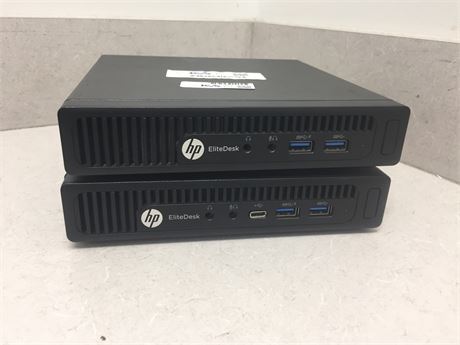
| 2 Mixed HP Elitedesks | $150.00 | Core i5-6500T / PRO A6-8500B | 8GB | 500GB HDD (one unit) | A pair of basic home machines |
| HP EliteOne 1000 G1 34-in Curved AIO | $100.00 | Core i5-7500 | 4GB DDR4 | No drive | A clean all-in-one setup |
| Apple Mac Pro 2013 | $160.00 | Xeon E5-2697 V2 | 16GB DDR3 | No drive | Heavy multitasking |
| Lot of 11 Apple Mac Pros 2013 | $3,300.00 | Xeon E5-1650 V2 / E5-2697 V2 | 16GB-64GB | 500GB-1TB SSD | Bulk or resale |
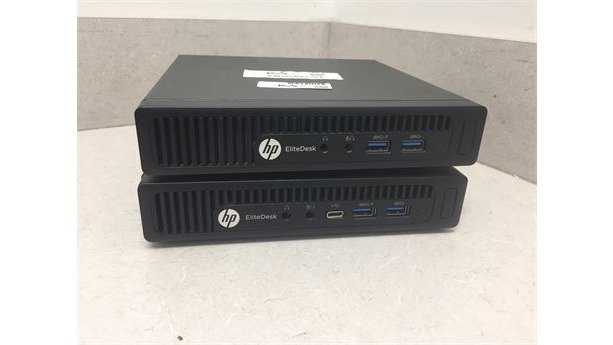
You can browse the full desktop inventory to see every listing available right now.
Refurbished Desktop Computer Specifications That Matter
For most home users, the specs that decide whether a refurbished desktop feels fast are the processor, RAM, and storage type. The useful question is which combination fits the work you actually do.
Everyday home use: email, browsing, streaming, homework. A 6th-generation or newer Intel Core i3 or Core i5, 8GB of RAM, and a 256GB solid-state drive is a sensible floor. If a listing has a hard drive, price an SSD swap into your budget.
Remote work and video calls. Aim for a Core i5 (8th generation or newer is preferable for Windows 11 support), 16GB of RAM, and a 512GB SSD. Video calls and browser tabs with many open tabs are memory-hungry, and 16GB gives headroom that 8GB does not. Confirm the machine has a webcam or budget for an external one, and check for a headphone jack or Bluetooth for headsets.
School and light creative work. A Core i5 or Ryzen 5, 16GB of RAM, and a 512GB SSD covers document work, spreadsheets, and light photo editing. For photo or video work, check the graphics option: integrated graphics handle basic editing, but a dedicated GPU helps with rendering. Many refurbished business towers accept a low-profile graphics card, but confirm the power supply wattage and available slot before assuming an upgrade is possible.
Gaming. A refurbished business desktop is rarely the best gaming base. Look for a Core i5 or i7 with a dedicated GPU, at least 16GB of RAM, and a 512GB SSD, and verify the power supply can support the card. Gaming desktops are a separate category, and a tower sold for office work may have a power supply too small for a modern graphics card.
Upgradeability checklist. Before you buy, confirm:
- Memory slots: how many are free, and what type and maximum capacity the board supports.
- Storage bays: whether there is room for a second drive and whether the board has an M.2 slot.
- Power supply: wattage and whether it uses standard connectors, which affects graphics-card upgrades.
- Form factor: small-form-factor machines save space but often limit upgrades.
Watch out: several of our listings ship with no drive and no operating system. Budget for an operating system license, and confirm the processor meets the requirements for the version you plan to run.
Refurbished All-in-One Computers for a Clean Home Setup
An all-in-one PC folds the screen and computer into one unit, so it saves desk space and cable clutter. Our HP EliteOne 1000 G1 is a 34-inch curved all-in-one with a Core i5-7500 and 4GB DDR4, listed at $100.00. It is listed as a base unit only: no drive, no operating system, and no power cable.
You can see this all-in-one listing to judge the fit for your space.
What a Refurbished Desktop Computer Warranty Should Cover
A refurbished desktop computer warranty should state three things plainly: the coverage length, what parts and labor it includes, and when the clock starts. A strong policy covers hardware failure for a defined period and explains how returns work if a unit arrives dead. But warranty terms are only one line in the real cost of ownership, so read them alongside shipping, likely upgrades, and expected useful life.
HP ELITEONE 1000 G1 34-IN CURVED AIO BASE ONY 4GB RAM →
Ask these questions before you buy:
- Does coverage start at purchase or at delivery?
- Are drives and power supplies included, or excluded as consumables?
- Is there a return window, and who pays return shipping?
- Does the policy cover the cost of return shipping, or only the part?
- Is the warranty transferable if you resell the machine?
Total cost and value over time. Compare the purchase price with the cost of the accessories and upgrades the listing does not include. A $100.00 all-in-one with no drive, no operating system, and no power cable is not a $100.00 computer once you add those items. Add the cost of a Windows license if no OS is included, an SSD if the unit ships with a hard drive, and extra RAM if the workload calls for 16GB. Then compare that total against a higher-priced listing that includes those items and a longer warranty.
Expected useful life. A 90-day warranty and a one-year warranty represent different risk, and that difference has a dollar value. If the seller offers an extended warranty, compare its price against the cost of replacing the unit.
Shipping and delivery. Factor shipping into the total, and check whether the seller covers return shipping on a warranty claim. Confirm the delivery window as well, especially if you need the machine for a start date.
For a deeper walkthrough of how these terms work, read our guide on how refurbished warranties are structured. Get the answers in writing; "as-is" with no stated terms is a warning sign. A warranty is only as good as the seller's willingness to honor it, so check the seller's return policy and contact process before you commit.
Refurbished vs. Used, Open-Box, and New: What You Are Actually Buying
The labels are not interchangeable. Refurbished means a machine was previously used, then tested and restored before resale, as PC Liquidations' buying guide describes. Used often means sold as-is with no testing claim. Open-box is a new item someone returned, usually untouched. New carries full retail price and a factory warranty.
The trade-off is cost against certainty. Refurbished sits in the middle: cheaper than new, but you should confirm the condition grade and testing claim for each unit. A "Grade A" or "professionally reconditioned" label is only meaningful if the seller explains what it covers.
A Practical Inspection Checklist Before You Buy
Run this checklist against any used desktop computers for sale before you commit:
- Confirm the exact processor, RAM amount, and storage type in the listing
- Check whether a drive and operating system are included
- Verify cables and power supply are in the box
- Read the condition grade and testing statement
- Confirm the warranty length and return window in writing
- Ask whether RAM and storage are upgradeable
- Calculate the total cost with any buyer's fees and shipping
For step-by-step testing guidance once a unit arrives, our guide on testing used computer hardware walks through what to check first.
Register to Bid on Your Next Home Desktop
The refurbished PC market is projected to grow from USD 13.34 billion in 2026 to USD 23.65 billion by 2035 at a 6.6% CAGR, per Business Research Insights' forecast. More buyers are choosing tested refurbished machines, and the smart ones check specs and warranty terms before they bid, not after.
At KVSAuctions.com, we list government surplus and refurbished desktops through auction, fixed-price, and classified formats, backed by our parent company KVS Computers. You can review specs, condition notes, and pricing on each listing before you commit.
Ready to find a machine that fits your desk and budget? Browse the available desktops and register to bid on your next home computer.
Frequently Asked Questions
Are refurbished desktop computers reliable for home use?
Yes, when they are tested and working before resale. Listings show the CPU, RAM, and storage included. Reliability depends on the seller's testing process and on matching the machine to your workload. A Core i5 desktop with 8GB of RAM handles browsing, email, and documents fine. Check the listing details and condition notes before you bid, and factor in the cost of any missing parts like a drive or power cable.
What should I check before buying a refurbished desktop computer?
Confirm the processor model, RAM amount and type, storage included, and whether an operating system is installed. Read the listing line by line: some units ship with no drive, no OS, and no power cable, which changes your total cost. Ask about the return policy and warranty terms. For a refurbished desktop computer, also verify the seller's testing claims and whether the machine is upgradeable. A quick checklist saves you from surprise expenses after delivery.
How much should I spend on a refurbished desktop for home use?
Budget between $100 and $200 for a basic home desktop, and more if you need higher specs or a lot purchase. On KVS Auctions, a single HP EliteOne all-in-one base is listed at $100.00, a Mac Pro 2013 with 16GB RAM at $160.00, and a two-pack of mixed HP Elitedesks at $150.00. A lot of 11 Mac Pros is listed at $3,300.00 for buyers outfitting multiple workstations. Add the cost of any missing drive, OS, or cables to compare fairly.
What is the difference between refurbished and used desktop computers?
Refurbished means the machine was previously used, then tested and restored before resale. Used simply means it had a prior owner, with no stated testing or restoration. That distinction matters for a refurbished desktop computer warranty and for how much risk you carry. Ask the seller what testing was done and what happens if the item arrives broken. A tested unit with a clear return policy is a safer buy than an as-is used listing with no recourse.
Can a refurbished desktop run Windows 11?
It depends on the processor and security features, not on the fact that it is refurbished. If a listing says no operating system is installed, budget for a license before you buy.