 Listicle
Are Refurbished Laptops for Sale Worth Buying?
Quick Summary
Refurbished laptops for sale can save a large share of the cost of new hardware, but the savings depend on condition, specs and what the seller includes. Each KVSAuctions.com listing carries its own test notes, battery reading and operating system status, so read those before bidding.
- Check the hardware and cosmetic grades together, then read the listed exceptions.
- Battery health is reported as a percentage of original capacity; a low reading may mean a replacement cost.
- Several listings ship with no operating system, so confirm you have a valid Windows license or plan to install one.
- Add the charger, license, shipping and any battery replacement to the bid price to find your true total.
- Start with a single machine rather than a lot to see how the test notes match the device.
Table of Contents
- Refurbished Laptops for Sale at KVSAuctions.com Right Now
- How Our Current Refurbished Laptop Listings Compare on Specs and Price
- Refurbished Laptops with Windows 11: What Comes Installed
- Refurbished vs. Used Laptops: What the Label Actually Means
- How to Check a Refurbished Laptop Before You Bid
- 1. Confirm the job and the specs
- 2. Check compatibility, ports and keyboard layout
- 3. Read the battery reading against your routine
- 4. Confirm the charger and the operating system
- 5. Verify the BIOS and the data-handling note
- 6. Read the return window and warranty exclusions
- 7. Set a total budget and a bid ceiling
- Refurbished Laptop Warranty and Return Terms to Read First
- Choosing Your Refurbished Laptop and Placing Your First Bid
- Frequently Asked Questions
Refurbished Laptops for Sale at KVSAuctions.com Right Now
Last Updated: November 19, 2026
Refurbished laptops for sale can save a buyer a large share of the cost of new hardware, but the savings depend on the condition, the specs and what the seller includes. Refurbished laptops are projected to account for 74.0% of the refurbished computers and laptops market in 2026 (Future Market Insights, 2026), driven partly by standardized battery testing and screen grading that make resale easier to verify (Explore the Global Refurbished Computers and Laptops Market, analysis of key trends...). Global Market Insights values the refurbished laptop market at USD 6.4 billion in 2025, with a forecast of USD 7 billion in 2026 (Global Market Insights, 2025) (Refurbished Laptop Market Size, Growth Forecasts 2026-2035). Global Market Insights refurbished laptop market report
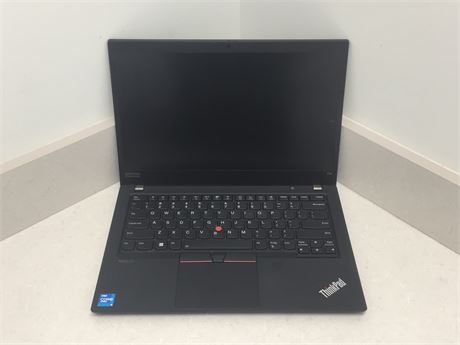
Our current listings range from a Lenovo ThinkPad T14 Gen 2 with 16GB of RAM to a Dell Precision 5330 mobile workstation with 32GB of RAM. The Lenovo ThinkPad T14 Gen 2 - Intel I5-1145G7, 16GB RAM, 256GB SSD, NO OS is listed at $190.00 with no operating system and no charger, which suits a buyer comfortable installing their own software. Two DELL LATITUDE 3190 2-IN-1s 8 GB RAM 128 GB NVME SSD Windows 11 PRO are listed at $240.00 and ship with Windows 11 Pro, which suits buyers who want a working machine out of the box.
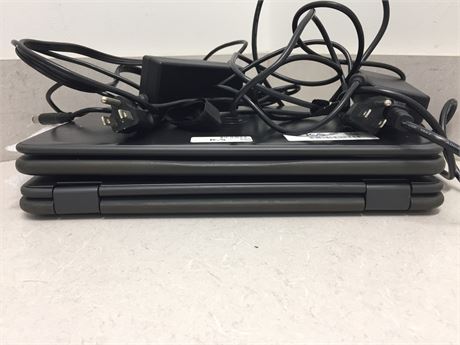
Other current listings include a Dell Latitude 7400 at $80.00, a lot of five Dell Latitude 3380s at $360.00, and an Apple MacBook Air 2022 with an M2 chip and 8GB of RAM at $500.00. Read each listing's test report and battery notes before bidding. Those notes, not the photos alone, decide whether a machine fits your use.
How Our Current Refurbished Laptop Listings Compare on Specs and Price
Price per listing means little without the specs behind it. Here is how the main current options compare:
| Listing | Price | CPU | RAM | Storage | OS Included |
|---|---|---|---|---|---|
| Lenovo ThinkPad T14 Gen 2 | $190.00 | Intel Core i5-1145G7 | 16GB | 256GB SSD | No |
| Lenovo ThinkPad T480 | $110.00 | Intel Core i5-8350U | 8GB | 256GB SSD | No |
| Dell Latitude 7400 | $80.00 | Intel Core i7-8665U | 8GB | 512GB SSD | No |
| Dell Latitude 7350 | $72.00 | Intel Core M-5Y71 | 8GB | 256GB SSD | No |
| Apple MacBook Air 2022 | $500.00 | Apple M2 | 8GB | 256GB SSD | macOS Tahoe |
| Dell Precision 5330 | $1,225.00 | Intel Core i9-8950HK | 32GB | 1TB SSD | Windows 10 Pro |
Price

The lowest price is not always the best value. The Dell Latitude 7350 costs $72.00 and uses an Intel Core M-5Y71 processor and 8GB of DDR3 memory. The Dell Latitude 7400 at $80.00 offers a stronger Core i7 processor and a 512GB drive, but its right hinge is broken and its battery reads 65% of original capacity. For heavier workloads, the Dell Precision 5330 at $1,225.00 offers 32GB of RAM.
Refurbished Laptops with Windows 11: What Comes Installed
Many buyers want Windows 11 from day one. Our 2 DELL LATITUDE 3190 2-IN-1s 8 GB RAM 128 GB NVME SSD Windows 11 PRO listing is the clearest option here.
The Apple MacBook Air 2022 includes a fresh installation of macOS Tahoe, but no charger. Check the charger situation before you bid, since replacement chargers add to the total cost.
Refurbished vs. Used Laptops: What the Label Actually Means
"Refurbished," "used," "renewed," "open-box" and "surplus" get used loosely, and the difference matters when comparing listings. Used, refurbished, renewed, open-box and surplus describe different histories, and the labels are used loosely. Read each listing's description to see what the device has been through.
Our listings are government surplus and refurbished technology. Each device is tested, and the test notes record what works and what does not. That is the difference between a tested machine and a used one: the notes, not the label, tell you what you are buying.
Reading the condition grades
Our listings use two separate codes. Refurbished laptop grades explained walk through what each hardware and cosmetic grade means in more depth. The hardware code describes function: F4 means the hardware is functional, with the specific exceptions listed in the test notes. The cosmetic code describes appearance: C4 means used good condition with light visible wear, while C3 shows more wear, scuffs or missing pieces. A machine can be F4 and C3 at the same time.
The cosmetic grade describes appearance, and the functional grade describes hardware performance. Read each listing's grades together with its listed exceptions.
What inspection should cover
Our test notes list the functional results for each device. The ThinkPad T14 Gen 2 lists failed USB ports, microphone and Wi-Fi, and the ThinkPad T480 lists a dysfunctional touchpad.
How condition moves the price
Battery health is reported as a percentage of original capacity. A battery at 65% of original capacity, like the Dell Latitude 7400, may suit a desk-bound buyer but may be a concern for someone who travels. Compare the total, not the sticker: a $72.00 machine with an older low-power processor and 8GB of DDR3 memory can cost more over two years than a $190.00 machine with a current processor and 16GB of RAM, once you add a charger, a license and a battery.
How to Check a Refurbished Laptop Before You Bid
A listing can look complete and still leave you with a machine that does not fit your work. Run this checklist before every bid, and keep the listing page and test report so you can compare what arrived against what was promised. Step-by-step guide to testing used hardware covers how to check a machine before you commit.
1. Confirm the job and the specs
Start with the work the laptop has to do. Web browsing, email and documents run comfortably on 8GB of RAM and a 128GB or 256GB drive. Photo editing, large spreadsheets and several demanding applications at once call for 16GB of RAM or more and a faster processor. Check the processor generation, not just the brand: the Dell Latitude 7350 at $72.00 uses an older low-power processor and 8GB of DDR3 memory, fine for light tasks but not heavy ones. The ThinkPad T14 Gen 2 at $190.00 pairs a Core i5-1145G7 with 16GB of RAM.
2. Check compatibility, ports and keyboard layout
List the ports you actually use: USB-A for older accessories, USB-C for docks and charging, HDMI for external displays, an SD card slot for cameras, and a headphone jack. The ThinkPad T14 Gen 2 lists failed USB ports, so confirm which ones and whether the remaining ports cover your setup. Check the keyboard layout if you type in more than one language, confirm the display size and resolution suit your work, and check whether the machine supports the external monitor resolution you plan to use.
3. Read the battery reading against your routine
Our listings report battery health as a percentage of original capacity. A battery at 92%, like the Dell Latitude 3190 2-in-1 pair, will last close to a new machine between charges. A battery at 65%, like the Dell Latitude 7400, suits a desk-bound user near an outlet but will frustrate someone who travels. Decide which you are before you bid, and price a replacement battery into the total if the reading is low.
4. Confirm the charger and the operating system
Listings that say "NO CHARGER IS INCLUDED" mean you need a compatible charger, and a replacement adds to the total cost. The same applies to the operating system: several current laptops, including the ThinkPad T14 Gen 2 and the Dell Latitude 7400, ship with no OS, so you need a valid Windows license or a plan to install a supported system. The Dell Latitude 3190 2-in-1 pair includes Windows 11 Pro, and the MacBook Air 2022 includes macOS Tahoe, though neither includes a charger in every case, so check each listing.
5. Verify the BIOS and the data-handling note
An unlocked BIOS lets you change boot settings when you install your own system, so confirm the listing states it. Our listings also state that each device was sanitized with software and evaluated as containing no data. Plan to reinstall the operating system and set up your own accounts after delivery, and check that no activation lock or management enrollment remains.
6. Read the return window and warranty exclusions
Each lot carries its own terms, and the terms decide what you can do if the machine fails. Our listings describe test results and functional status and state that battery health cannot be guaranteed on previously used machines. Do not assume a new-equipment warranty applies. Read the listing and the attached test report for the exact statements. Some listings also carry shipping terms: the Apple MacBook Pro listing from a different seller sets a $20.00 handling fee and requires a shipping label from the buyer.
7. Set a total budget and a bid ceiling
Add the bid price, any charger, any operating system license, shipping and handling, and a likely battery replacement if the reading is low. That total is the number to compare across listings, not the sticker price. Set a ceiling below your maximum and stop there.
Refurbished Laptop Warranty and Return Terms to Read First
Our listings describe test results and functional status, and they state that battery health cannot be guaranteed on previously used machines. Do not assume a new-equipment warranty applies. Read the listing and the attached test report for the exact statements that apply.
Factor shipping and handling into your total cost before you bid. Keep the listing page, the test report and any photos you rely on in case of a dispute.
Choosing Your Refurbished Laptop and Placing Your First Bid
Start with the job the laptop needs to do.
Then set a total budget. Add the price of any missing charger, operating system license and shipping to the bid price.
Place your first bid with a margin below your maximum. Tips for buying surplus tech safely outline safeguards to check before you commit any money. Watch the listing for a few days to see how competitive bidding moves.
Ready to find your next machine? Browse our current refurbished laptops for sale at KVSAuctions.com and read each listing's test notes before you bid.
Frequently Asked Questions
What is the best site for refurbished laptops?
The best site depends on what you need: price, technical support, or a clear return policy. KVSAuctions.com lists refurbished laptops for sale through auction and fixed-price formats, and each listing states the tested hardware, battery health reported at testing, and whether an operating system is installed. Compare those details side by side on any site you consider, and read the full item description before placing a bid or paying.
Are refurbished laptops reliable?
Reliability depends on how the machine was tested and what you are buying. Reliability depends on how a machine was tested and what you are buying, so check the test report and battery reading on each listing.
What is the difference between a refurbished and a used laptop?
A used laptop is sold as it was previously owned, often with no formal testing. A refurbished laptop has been inspected, repaired where needed, and tested before resale. Listings at KVSAuctions.com note that devices are stress-tested and reported with a condition grade, though some lots are sold without an operating system or charger, so the label alone does not tell you everything. Read the specific condition note before you bid.
Can refurbished laptops run Windows 11?
Some can, but it depends on the hardware and whether the listing includes an operating system. The Dell Latitude 3190 2-in-1 lot at KVSAuctions.com is listed with a fresh installation of Windows 11 Pro, starting at $240.00 for two units. Many other listings, including several Lenovo ThinkPads and Dell Latitudes, are sold with no operating system installed, so you would need to supply a valid license and install it yourself.