 listicle
9 Surplus Electronics Picks for a Small Nonprofit Office
Quick Summary
Surplus electronics offer a practical way for small nonprofit offices to cover everyday computing needs at a fraction of new-equipment prices. Refurbished units handle email, documents, spreadsheets and web-based donor systems well, though staff should verify condition and setup costs first.
- Used equipment sells for less than new, letting small teams buy more machines or save for programs.
- The Dell Latitude 3380 is the top pick at $180.00, with Windows 11 Professional and a charger included.
- Check whether a listing includes a test report, battery health percentage and operating system edition before bidding.
- Budget for missing accessories, operating system licenses and setup labor, which can add up quickly.
- Wipe every drive before donated or surplus devices join your network, and document the wipe.
Table of Contents
- Why Surplus Electronics Make Sense for a Small Nonprofit Office
- Ranked Picks: The Best Surplus Devices for Small Office Work
- Discounted Laptops for Nonprofits: Comparing Price, Condition and Total Cost
- Refurbished Computers for Nonprofits: Testing, Warranty and Software Checks
- Donated Electronics for Nonprofits and Free Computer Options
- Accessories and Peripherals That Round Out a Small Office
- Choosing Your First Surplus Purchase for the Office
- Frequently Asked Questions
Why Surplus Electronics Make Sense for a Small Nonprofit Office
Last Updated: November 14, 2026
Surplus electronics can cover a small nonprofit's basic computing needs at a fraction of new-equipment prices.
The main advantage is cost. Used equipment is sold at a lower price than new equipment, which can let a small team buy more machines or save money for programs.
The trade-offs are real. Refurbished machines have shorter remaining lifespans, and some items arrive without drives, chargers or operating systems.
Ranked Picks: The Best Surplus Devices for Small Office Work
Our ranking favors devices that handle standard office tasks, come with a working operating system and have a documented condition.

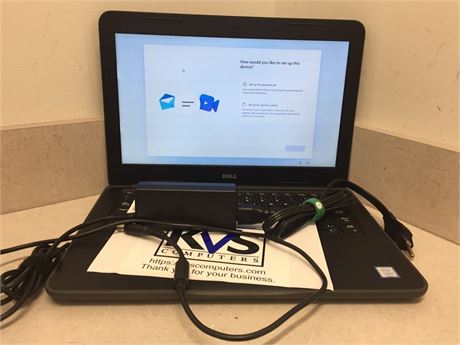
Dell Latitude 3380 for everyday desk work
The Dell Latitude 3380 is our top pick for routine office work. It runs an Intel Core i5-7200U processor with 8GB of RAM and a 256GB SATA SSD, and it comes with a fresh Windows 11 Professional installation and a charger. The listing says the machine has been stress-tested with no reported issues, and the battery reports 85% of its original capacity. At $180.00 per unit, it suits staff who mainly use email, documents and web applications.
Lenovo ThinkPad T14 Gen 2 for staff who need more memory
The ThinkPad T14 Gen 2 suits staff who run several applications at once. Its 16GB of DDR4 memory and 256GB NVMe SSD give it more memory than the Latitude, and its 1920x1080 display has a higher resolution. The catch: this listing has no operating system and no charger, and the test report notes failures on the USB ports, microphone and Wi-Fi.
Discounted Laptops for Nonprofits: Comparing Price, Condition and Total Cost
The sticker price is only part of the cost. Compare the price against what the machine needs to become usable.
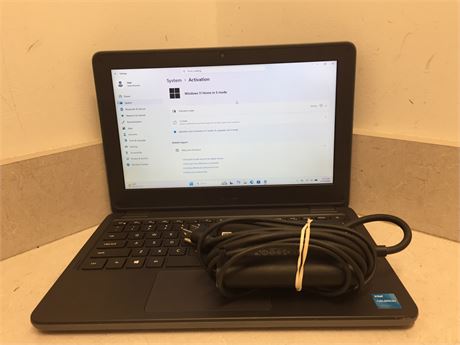
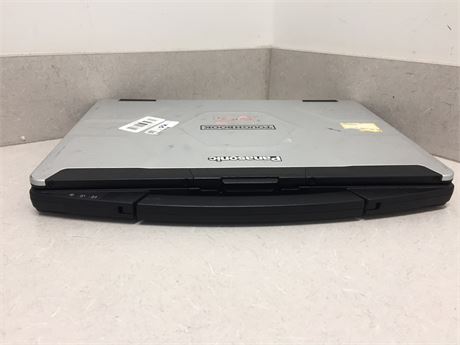
Look at four factors: purchase price, condition notes, included accessories and setup time. Our older-model options, such as the Dell Latitude 3120 at $60.00, are lower priced and come with 4GB of RAM and 64GB of eMMC storage. The Panasonic Toughbook CF-54-2 at $200.00 arrives with no drive, no operating system and no charger.
Use this quick comparison to weigh the options:
| Device | Price | What's Included | Main Limitation |
|---|---|---|---|
| Dell Latitude 3380 | $180.00 | Windows 11 Pro, charger | Small 13.2" display |
| Lenovo ThinkPad T14 Gen 2 | $190.00 | 16GB RAM, 256GB SSD | No OS, no charger |
| Dell Latitude 3120 | $60.00 | Windows 11 Home S Mode | Only 4GB RAM |
| Panasonic Toughbook CF-54-2 | $200.00 | 8GB RAM | No drive, no OS, no charger |
Price
Refurbished Computers for Nonprofits: Testing, Warranty and Software Checks
Because "tested" means different things at different sellers, use the checklist below against any listing before you bid. For background on quality and warranty coverage, read whether refurbished electronics are worth buying.
The condition and testing checklist
Work through these items in order. If a listing cannot answer three or more, treat the price as a starting point, not a final cost. For a step-by-step guide to verifying refurbished laptop condition, follow each check before you bid.
- Test report attached. Look for a stress test or diagnostic report naming the components checked, CPU, memory, storage, USB ports, audio, Wi-Fi and battery. A listing that says only "powers on" has not been tested in any useful sense.
- Battery health stated as a percentage. If health is not listed, assume replacement is likely and price a compatible battery before bidding.
- Operating system installed and activated. Confirm the exact edition (for example, Windows 11 Professional versus Windows 11 Home in S Mode) and whether the license is included. A machine with no OS needs a license, installation time and driver work.
- Accessories included. Chargers, power cords and drive caddies are the most commonly missing parts.
- Storage type and size. A 256GB SSD is the practical floor for office work. Machines with 64GB of eMMC storage fill up quickly once the operating system, browser and office suite are installed.
- Cosmetic grade versus functional grade. Scratches and scuffs are normal and do not affect use. Cracked hinges, missing keycaps, dead pixels and worn ports do. Ask which grade the listing uses and whether returns are accepted for functional defects.
- Warranty or return window. Government surplus is often sold as-is, so the return policy matters more than the warranty label. Read whether returns are accepted for dead-on-arrival units and how many days you have to test.
Software and security support
Hardware that runs is not the same as hardware that is safe to put on your network. Confirm the device meets your organization's software support requirements.
- Operating system support. Check the processor generation against the Windows 11 supported processor list before assuming an upgrade is possible.
- Security updates. Confirm the device can receive current security patches. An unsupported OS on a machine that touches donor data is a risk your insurer and your donors will not thank you for.
- Network compatibility. Check for Wi-Fi 5 (802.11ac) or better and a working Ethernet port. Older Wi-Fi standards can be slow enough to disrupt video calls and cloud-based donor systems.
Total cost of ownership: the number that actually matters
The purchase price is only the first line. Build a simple total-cost estimate for each candidate before you compare them:
| Cost line | What to estimate | Typical range to budget |
|---|---|---|
| Purchase price | The listing or bid amount | Varies by listing |
| Shipping | Flat or per-unit freight | Confirm before bidding |
| Missing accessories | Charger, cords, caddy | $25-$60 per laptop |
| Operating system license | Only if no OS is included | Retail or nonprofit-licensed |
| Setup labor | Staff or volunteer hours to image, update and enroll | 1-3 hours per machine |
| Repairs | Ports, battery, keyboard | Quote from the test report |
| Warranty or support | Optional coverage | Varies |
| Replacement horizon | Years of useful life | 3-5 years typical for business-class units |
Watch out: a listing that shows a low price but omits battery health, OS edition and return window is not a bargain, it is an unknown. Ask the seller directly, in writing, before you bid.
Donated Electronics for Nonprofits and Free Computer Options
Donated equipment can stretch a small budget, but the programs that supply it have eligibility rules, application steps and quantity limits that decide whether it is actually free.
The main routes to donated or low-cost equipment
- Nonprofit technology donation programs. Large technology companies run donation and discount programs for eligible 501(c)(3) organizations. They typically require proof of nonprofit status, may charge a small administrative fee, and limit how many units an organization can request per year. Availability changes, so check the current catalog before planning around a specific model.
- Corporate and business refreshes. Local businesses, banks and professional firms replace laptops on a fixed cycle and often donate old units to nonprofits they already support. These donations are relationship-driven: ask your board members and corporate partners first, and be specific about what you need (business-class laptops with chargers, not consumer machines).
- Government surplus property programs. Government surplus programs may make used equipment available to eligible organizations. Confirm each program's eligibility and registration requirements before you register.
Eligibility and application comparison
| Route | Typical eligibility | Documentation | Quantity limits | What to expect |
|---|---|---|---|---|
| Nonprofit technology donation program | Registered 501(c)(3) or equivalent | IRS determination letter, organization contact | Per-year caps per organization | Discounted or donated hardware; catalog changes |
| Corporate refresh donation | Relationship with the donor | Donor's own paperwork | Whatever the donor offers | Mixed ages and conditions; often no warranty |
| Government surplus | Eligible public and nonprofit organizations per program rules | Registration and eligibility verification | Per-lot or per-auction limits | As-is condition; inspection before bidding |
| School or community donation | Local relationship | Varies | Small lots | Older units; may need OS and repairs |
What donated equipment really costs
Donated hardware is rarely free once you count the work. Budget for the following before accepting a pallet of machines:
- Testing and triage. Expect 30 to 60 minutes per unit checking power, ports, battery and storage, and set aside a share of units as parts donors.
- Data handling. Donated machines may arrive with previous user data still on the drive (How-To Guide for Removing Data from Storage Media | NIST). Wipe every drive before the device touches your network, and document the wipe.
- Licensing. A donated laptop without an operating system license needs one. Factor the license cost into the decision.
- Replacement parts. Chargers, batteries and drives add up quickly across a batch.
A common pattern is to pair donated hardware with a small purchase of tested, ready-to-use devices for the staff who cannot afford downtime. That mixed approach keeps costs low without leaving key roles with unreliable machines.
Responsible disposal and data handling
Plan the end of life before the equipment arrives. When you retire a device, wipe the drive before reuse, keep a record of the wipe, and recycle the hardware through an electronics recycler rather than putting it in the trash.
Watch out: accepting a large donation of untested equipment can turn into a storage and disposal problem. Ask for the quantity, age and condition before you say yes, and decline lots you cannot test and support.
Accessories and Peripherals That Round Out a Small Office
A laptop alone rarely covers a full workday. A Dell Docking Station D3100 with 65W power supply at $100.00 is an option if staff work at a desk and want one cable to connect peripherals. The listing describes it as tested, used and in fair cosmetic condition, with a sanitized drive.
Other low-cost items worth considering include five new computer power cords at $50.00, a lot of 25 new 16GB USB 3 flash drives at $200.00 for backups and file transfers, and four new 10Gear USB 2.0 print servers at $40.00 if you need to share an older printer across the office. Check each listing's condition codes before buying.
Choosing Your First Surplus Purchase for the Office
Start small. Buy one or two machines that match your most common tasks, test them, then decide whether to expand.
Before you bid, confirm the device meets your software needs, budget for missing parts, and read every listing carefully.
Ready to find affordable equipment for your office? Browse current electronics listings at KVSAuctions.com, where every item is described in detail so you can bid with confidence.
Frequently Asked Questions
Can nonprofits get free computers or laptops?
Free equipment is not guaranteed. At KVS Auctions, buyers can bid on refurbished laptops and desktops directly, with listings showing specs such as processor, RAM, storage and operating system. Compare the listed condition and total cost against any donation option before deciding which route fits your office budget.
Where can nonprofits find discounted laptops?
Nonprofits often look at refurbished laptop sellers, surplus auctions and nonprofit technology programs. At KVS Auctions, a Dell Latitude 3380 with 8GB RAM and a 256GB SATA SSD is listed at $180.00, and a Dell Latitude 3120 with 8GB RAM is listed at $60.00. Check whether a charger is included, since several listings state that chargers are not included with the machine.
What should a nonprofit check before buying surplus electronics?
Read the full listing before bidding. Check whether an operating system is installed, whether a charger is included, the reported battery health and any failed test results. For example, one Lenovo ThinkPad T14 Gen 2 at KVS Auctions is listed with no operating system and no charger, and its test report notes failures on USB ports, microphone and Wi-Fi. Budget for a Windows license and a charger if the listing does not include them.
Is refurbished technology a good choice for a nonprofit office?
Check that the specs match the work you need the machine to do. At KVS Auctions, listings state whether machines were stress-tested and include fresh Windows 11 installations where applicable. Battery condition is usually not guaranteed on used equipment, so plan for replacement if mobile use matters.