 listicle
Best Online Auctions for Surplus Electronics: 7 Sites Compared
Quick Summary
Surplus electronics auctions let buyers bid online on equipment that governments, schools, hospitals and businesses no longer need. Before bidding, compare each site's buyer's premium, bidding rules, condition disclosure and shipping or pickup terms. The winning bid is rarely the total you pay, so add fees and missing parts first.
- Buyer's premiums across government auction sites range from 0% to 16.5%, so check where each site states its premium.
- Lot-heavy inventory suits labs needing many identical machines, while single-unit listings suit one-off buyers.
- Check whether a listing names missing parts like drives or power cables instead of a generic sold-as-is statement.
- Set a maximum bid including fees, taxes and repairs, and stick to it.
Table of Contents
- How Surplus Electronics Auctions Work
- Side-by-Side Comparison of Surplus Electronics Auction Sites
- Current KVSAuctions.com Electronics Listings and Prices
- Buyer Fees, Total Cost, and Shipping or Pickup
- How to Bid on Government Surplus Auctions Safely
- Checking Electronics Condition, Testing, and Returns
- Choosing the Right Surplus Electronics Auction for Your Next Purchase
- Frequently Asked Questions
How Surplus Electronics Auctions Work
Surplus electronics auctions let buyers bid on equipment that governments, schools, hospitals and businesses no longer need. At KVSAuctions.com, we list government surplus laptops, electronics and refurbished technology, and bidding is done online. New auctions are posted regularly, and the process is designed to be simple, even for first-time buyers.
Most listings follow the same pattern. You search or browse, read the full description, place a bid, and win if your bid is the highest when the auction closes. KVSAuctions.com also uses fixed-price and classified listings alongside auctions, so you can choose the format that fits how quickly you need the item.
USA.gov notes that government auction listings may include computers and lab equipment, among other property types USA.gov guidance on government auction listings. That range is why the item description matters so much. A lot of electronics can include a working machine, a machine with no drive, or a box of parts.
Side-by-Side Comparison of Surplus Electronics Auction Sites
A buyer-focused comparison of auction sites should weigh five things: inventory mix, buyer's premium and fees, bidding rules, condition disclosure, and shipping or pickup terms. Here is how to run that comparison before you register anywhere.
Inventory mix. If you need 20 identical machines for a lab, lot-heavy inventory is the better fit; if you need one working laptop, single-unit listings save you from reselling the extras.
Buyer's premium and fees. A 2026 comparison of government auction sites reports buyer's premiums ranging from 0% to 16.5% across the platforms it reviewed, though it does not break the fee out by site BidProwl comparison of government auction site fees. That spread is the single biggest variable in your total cost. A 10% premium on a $500 winning bid adds $50 before tax, shipping, or missing parts. Ask each site where its premium is stated, whether it applies to shipping charges, and whether there is a minimum fee per lot.
Bidding rules. Check the bid increment schedule, whether there is a reserve price, whether proxy or maximum bidding is supported, and how the auction handles a bid placed in the final seconds. Some auction sites use a soft-close that extends the auction when a late bid arrives; others close at the stated time. The difference decides whether you can snipe an item or must be present at the close.
Condition disclosure. The best sites state testing status, missing accessories, and whether the item is sold as-is in the listing body, not in a sitewide disclaimer. Look for listings that name the specific missing part (no drive, no power cable, no operating system) rather than a generic "sold as-is."
Shipping and pickup. Compare whether the site ships, requires pickup at a fixed location within a deadline, or offers a third-party shipper. Bulky items like servers and rack gear are often pickup-only, so check the pickup window in each listing before you bid.
Here is how the KVSAuctions.com inventory compares by what you are likely to buy:
| Category | Typical Listing Example | Starting Price (USD) | Best For |
|---|---|---|---|
| Desktops | Lot of 11 Apple Mac Pros | $3,300.00 | Small studios and labs |
| Desktops | Single Apple Mac Pro 2013 | $160.00 | Hobbyists and upgraders |
| Desktops | 2 Mixed HP Elitedesks | $150.00 | Budget office setups |
| Hard Disk Drives | 20 500 GB SATA HDDs | $200.00 | Storage projects |
| Routers | Ruckus ICX7150-48ZP switch | $250.00 | Business networking |
Compare listings on what is included, not only on price. A lower price can mean the item is missing parts you will have to buy later.
Match the site to your buyer type. Consider whether you need single units or lots, clear condition notes, and pickup or freight options that fit your timeline before you choose a listing.
Current KVSAuctions.com Electronics Listings and Prices
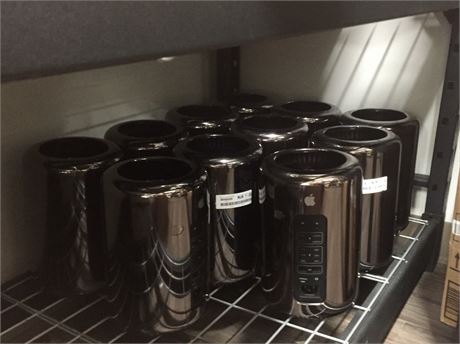
The current catalog shows how wide the range is. For buyers who want to compare specific machines, the Lot of 11 Apple Mac Pros - 2013 is listed at $3,300.00 and includes 11 tested and working Mac Pros with Xeon processors, RAM from 16GB to 64GB, and SATA SSDs. Cables are not included.

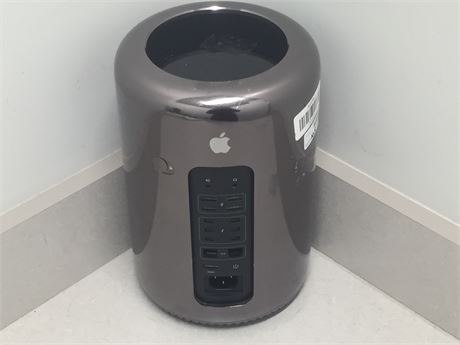
A single Apple Mac Pro 2013 - Intel Xeon E5-2697 V2, 16GB RAM, NO DRIVE is listed at $160.00. The listing states it is tested and working, but it has no drive and no cables. That matches a buyer who already owns storage and power leads.
The 2 Mixed HP Elitedesks are listed at $150.00. One machine has no drive, and the other has a 500 GB SATA HDD. Neither includes an operating system or a power cable, so plan for both before you bid.
For graphics upgrades, the Nvidia EVGA GTX 680, 2GB GDDR5 is listed at $45.00 and the GTX 970, 4GB GDDR5 at $50.00. Both are listed as tested and working in a live machine.
Buyer Fees, Total Cost, and Shipping or Pickup
The winning bid is rarely the total you pay. Surplus electronics carry a stack of add-on costs, and the only reliable way to avoid overpaying is to build the full total before you bid. Here is the cost stack, in the order it usually hits your invoice.
Buyer's premium. This is the auction house's commission, charged as a percentage of the winning bid and added on top. A 2026 comparison of government auction sites reports premiums ranging from 0% to 16.5% across the platforms it reviewed BidProwl comparison of government auction site fees. On a $400 bid, a 12% premium adds $48. Check whether the premium is calculated on the bid alone or on bid plus shipping.
Sales tax. Sales tax depends on your state and sometimes your county. Resellers should confirm whether the site accepts a valid resale certificate before bidding.
Shipping or freight. Shipping costs depend on the item and its delivery method. Check the shipping terms in each listing before you bid.
Pickup costs. Some lots are pickup-only at a fixed location within a set window. Budget for transport and your time, and check each listing's pickup terms.
Missing parts and refurbishment. This is the cost buyers most often forget. A machine with no drive needs storage; a machine with no operating system needs a license; a lot with no cables needs power leads and display adapters. Price those parts before you bid, not after.
How to Spot Hidden Fees in Online Auctions shows how small charges can inflate a winning bid, and How Do You Calculate Total Costs for Government Auctions? walks through adding buyer fees, taxes, pickup and repair costs to find your real maximum bid.
Returns and disputes. Return terms differ by listing. Read the seller's return policy before bidding.
Watch out: a bid on a machine with no operating system can cost more once you add the software and parts you need to make it usable, so write the full total down before you place the bid.
How to Bid on Government Surplus Auctions Safely
Government surplus auctions are public sales, so the rules are straightforward, but they still reward careful buyers. Read each listing's full description before you bid, check the lot quantity, and confirm what is and is not included. USA.gov's guidance on government auctions is a useful starting point for understanding how these sales are run USA.gov overview of government auctions and sales.
Set a maximum bid in advance and stick to it. Bidding on emotion is the most common way buyers overpay. Only bid on items you intend to pay for and collect.
Checking Electronics Condition, Testing, and Returns
Condition is the biggest risk in surplus electronics. At KVSAuctions.com, listings describe whether an item has been tested. The Lot of 17 500 GB 2.5" SATA HDDs at $170.00 states that drives were erased and tested with commercial software and report good health with no remapped sectors. Read the wording closely, because "tested and working" does not always mean everything in the box works.
Before you bid on a refurbished laptop or desktop, check whether it includes a drive and operating system, and whether you have the skills to set it up. Follow a step-by-step guide to verifying refurbished laptop condition before you commit. Some KVSAuctions.com items are sold incomplete and are meant for technically skilled buyers who can refurbish them themselves. If that is not you, favor fully described listings.
Compare the seller's return terms in each listing before you bid, since they can differ by item.
Choosing the Right Surplus Electronics Auction for Your Next Purchase
Choose based on what you need and how much setup time you can handle. Students and budget buyers often do best with single machines and small lots. Small business owners buying for a team may find lots more efficient, as long as they plan for missing parts. Hobbyists chasing specific hardware should check model numbers and specs before bidding.
Start by setting a total budget that includes fees and extras. Then read the full description of each lot and choose the one that fits your skills and timeline. Browse current KVSAuctions.com electronics listings to compare what is available right now.
Frequently Asked Questions
What are the best online auction sites for surplus electronics?
The best choice depends on what you need. KVSAuctions.com lists desktops, drives, GPUs and networking gear across auction, fixed-price and classified formats, and only verified buyers can take part in bidding. Compare each site's buyer fees, item descriptions and pickup or shipping terms before you bid, since a low hammer price can be offset by higher fees or shipping costs. Check each listing's condition notes carefully.
Are government surplus auction sites legitimate?
Yes. Government surplus auctions are a common way for agencies to sell retired equipment. Legitimate sites show clear item descriptions, transaction security and seller information. Verify that a site's payment process is secure and that listings describe item condition. KVSAuctions.com requires verified buyers to bid and secures every financial transaction.
Are surplus electronics sold as-is?
Many surplus electronics are sold as-is, meaning the buyer accepts the item in its listed condition. Some KVSAuctions.com listings are sold without components such as hard drives, operating systems or power cables, and buyers should read each full description before placing a bid. Items that are tested and working are noted as such. Confirm the return policy for each item before you bid.
How do I calculate the total cost of an online auction purchase?
Start with your winning bid, then add the buyer's premium, applicable sales tax, shipping or pickup costs and any handling fees listed by the site. Buyer's premiums vary between auction sites, so the same hammer price can cost noticeably different amounts. Always confirm the full breakdown before you bid.