 how-to
How to Buy Bulk Laptops at Government Surplus Auctions
Last Updated: November 8, 2026
Quick Summary
A bulk laptop auction in the USA lets buyers win a lot of several used computers with a single bid, often at a fraction of retail. Government surplus sales are the most common source, and the winning bid is only part of your cost once fees, pickup and missing parts are added.
- Set a maximum bid that includes buyer fees, shipping, and any repair budget.
- Lots often bundle several machines, so check how many are included before bidding.
- Confirm whether the lot includes an operating system, charger, or drive.
- Divide your total cost by the number of machines to get your cost per laptop.
- Register and get verified before the lot you want closes, since bidding requires it.
Table of Contents
- How a Bulk Laptop Auction Works
- Government Surplus Laptop Auctions: What Sells and Why
- How to Bid on Surplus Auctions Without Overpaying
- Reading Laptop Auction Lot Condition Before You Bid
- Auction Buyer Fees and Pickup: Calculating Your Real Total
- Due Diligence Checks That Protect Your Budget
- Planning Your First Bulk Laptop Bid on KVSAuctions.com
- Frequently Asked Questions
How a Bulk Laptop Auction Works
Bulk laptop auction in the USA formats let buyers win large lots of used computers in a single bid, often at a fraction of retail. At KVSAuctions.com, we see the same pattern again and again: a shopper who understands the process before bidding ends up with better deals and fewer surprises. Government surplus sales are the most common source of these lots, and the platform you choose matters less than how well you read each listing.
A typical lot is one listing that bundles several machines. You bid on the whole group, and the highest bid wins it. Some lots contain matched models, while others mix brands, generations and conditions. Before you bid, check how many machines are included, whether the lot includes operating systems, chargers or drives, and what the seller says about testing. For a step-by-step approach to testing used computer hardware before you buy, use this checklist alongside the listing.
Here is how a standard auction usually runs:
- Browse the listings. Filter by category, such as laptops, and open the full description for each lot.
- Review the photos and the test report. Many sellers attach a PDF showing what was checked.
- Place your bid. Bids are online, and you must be a verified buyer to participate.
- Win and pay. The winning bid, plus any buyer fees, is due within the seller's deadline.
- Arrange pickup or shipping. Some lots must be collected locally, so confirm logistics before you bid.
Government Surplus Laptop Auctions: What Sells and Why
Government agencies retire large volumes of computers on a regular schedule, and those machines are sold through surplus auctions. Because the supply is steady, buyers can often find lots of business laptops from well-known manufacturers.
The refurbished computer market is growing. One industry estimate puts the global refurbished computers and laptops market at USD 23.9 billion in 2026, rising to USD 63.1 billion by 2036 (Future Market Insights refurbished computers and laptops market analysis). That estimate is global, so treat it as context for demand rather than a measure of U.S. auction prices.
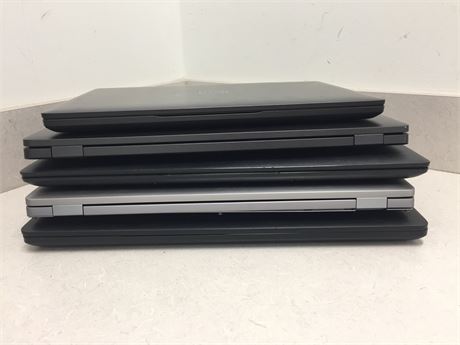
Business-class models tend to be the most common in government lots offered through a bulk laptop auction in the USA. Dell Latitude machines appear frequently in KVSAuctions.com listings, such as the Lot of 5 Mixed DELL Laptops - NO OS at $350.00.
How to Bid on Surplus Auctions Without Overpaying
The biggest mistake new bidders make is treating the winning bid as the final price. Set a maximum before you start, and include fees, shipping and any repair budget in that number. But the mechanics of bidding matter just as much as the number, most surplus platforms run on the same basic machinery, and knowing it in advance is what separates a controlled purchase from a bidding war.
Register and get verified before the lot you want closes
Registration and buyer verification are required before you can bid, so set up your account well before a lot you want closes.
Understand how the bidding clock and increments work
Check each listing for its closing rules and bid increments before you bid, because these set the smallest possible raise you can make.
Set your maximum bid before the lot closes and stick to it, so emotion does not drive the final minutes.
Know what happens the moment you win
Winning is not the end of the transaction. Review the payment and pickup terms in each listing before you bid, since missing a deadline can forfeit the lot.
Keep these habits when you bid:
- Set your maximum per laptop, then multiply by the number of machines in the lot.
- Compare the lot against similar listings that have already closed.
- Confirm the payment method and deadline before you bid, not after. Learn how to collect, hold and refund auction item deposits so you know what to expect before your first bid.
- Confirm you can physically collect the lot inside the pickup window, or that the seller ships.
- Stop when the price passes your number, even if you feel tempted to keep going.
Lots that come without an operating system or charger will need extra work and cost, so budget for that before you bid. Read the removal terms in each listing line by line before you commit.
Reading Laptop Auction Lot Condition Before You Bid
Condition is where many buyers get caught out. A lot can look complete in photos and still contain machines that fail basic tests. Read the description line by line, then open the test report if one is attached. You can also follow a step-by-step guide to verifying refurbished laptop condition to check each machine against the listing.

Look for these details:
- Processor, RAM and storage for each machine in the lot
- Display size and resolution
- Battery health, which is often reported as a percentage
- Included accessories, such as chargers
- Known faults listed by the seller
For example, one KVSAuctions.com lot of five Dell machines lists battery capacities of 53%, 53%, 66% and 72%, and notes that battery health cannot be guaranteed. Another single ThinkPad lot reports that its USB ports, microphone and Wi-Fi failed testing. Failures like these are not automatic deal-breakers, but they change what the lot is worth to you.
What Testing and Missing Parts Mean
"Tested and working" usually means the machine powered on and passed a set of checks at the time of testing. It does not guarantee the battery, the drive or every port will perform well over time. A "no drive" note means the machine ships without a hard drive or solid-state drive, so you will need to buy one.
Missing operating systems and chargers are common in surplus lots. These are not defects, but they add cost. Price them in before you bid.
Auction Buyer Fees and Pickup: Calculating Your Real Total
Your real cost is the winning bid plus everything that comes after it. Use this detailed breakdown of government auction costs beyond the winning bid to work out your true maximum bid. Buyer fees, sales tax where it applies, shipping or pickup travel, and the cost of replacement chargers or drives all add up. The problem is that most buyers estimate these loosely and then discover the gap after they have already committed. Here is how each line actually behaves.
Buyer premium and fees
Check the fee schedule in the auction terms before you bid, since buyer fees are added on top of the winning bid.
Sales tax
Sales tax treatment can vary by state and by seller, so confirm how tax applies to a lot before you bid.
Pickup, freight, and the cost of getting it home
Lots can be bulky and heavy, so confirm before bidding whether pickup is local only, whether the seller ships, and what loading or transport arrangements the listing requires.
Repairs, missing parts, and data handling
Machines without an operating system or charger will need those added, and a lot listed without a drive will need one. Budget for these items before you bid.
A worked example
Suppose you win a 10-laptop lot at a hammer price of $1,200. Add the buyer fees, any applicable sales tax, your pickup cost, and a repair budget for missing parts, then divide the total by 10 to find your cost per laptop. Compare that figure against your resale or use-case target before you decide whether the lot leaves margin.
Use a simple worksheet before you bid:
- Winning bid amount
- Buyer premium or fees listed in the auction terms
- Estimated tax, if the sale is taxable where you live
- Pickup or shipping cost
- Repair or replacement budget for missing parts
- Total divided by the number of machines = your cost per laptop
Compare that per-laptop figure against your resale or use-case target. If the total leaves no margin, pass on the lot.
Before you bid, the total you pay goes well beyond the winning price. These are the cost lines the article covers:
| Cost line | What to check | Note |
|---|---|---|
| Winning bid | Hammer price for the whole lot | Your starting figure |
| Buyer fees | Fee schedule in auction terms | Added on top of the bid |
| Sales tax | Applies by state and seller | Confirm before bidding |
| Pickup or shipping | Local pickup only, or seller ships | Lots can be bulky and heavy |
| Missing parts | OS, charger, or drive not included | Budget before you bid |
| Cost per laptop | Total divided by number of machines | Compare to your resale target |
Due Diligence Checks That Protect Your Budget
Before you pay, read the auction terms for return rules, payment deadlines and deposit handling, and ask questions through the platform before the auction closes if a description is unclear.
Watch for these warning signs:
- Vague descriptions such as "untested" or "as-is" without specifics
- Photos that do not match the written specifications
- Missing test documentation for a lot priced as tested
- Deadlines you cannot meet
Keep records of your bid, your payment and the lot description.
Planning Your First Bulk Laptop Bid on KVSAuctions.com
Start small. Your first bid should be a lot you understand completely, with a clear maximum and a realistic plan for pickup and repairs. KVSAuctions.com is designed to be simple for first-time buyers: bids are placed online at KVSauctions.com, and new auctions are posted regularly.
Use this checklist before you bid:
- Confirm the number of machines and their specifications
- Check operating system, charger and drive status
- Read the test report and battery notes
- Calculate your total cost per laptop, including fees and pickup
- Set your maximum bid and stick to it
- Confirm you can meet the payment and pickup deadlines
Browse current bulk and mixed laptop lots to see how these listings are described, then register on KVSAuctions.com to start bidding. Registration is required before you can bid, so set up your account before a lot you want closes.
Ready to start? Register on KVSAuctions.com, read each lot's full description, and bid with a clear number in mind.
Frequently Asked Questions
Where can I buy bulk laptops at auction?
Bulk laptops are sold through online government surplus auctions, including KVSAuctions.com, which lists laptops, desktops, and electronics in lots. Read each listing's terms, including registration, fees, and pickup, before you bid. Filtering by category and lot size helps you find multi-unit listings quickly. Compare each lot's stated condition and quantity against your needs before committing money.
How do government surplus laptop auctions work?
Agencies send retired equipment to an auction platform, which lists it in lots for online bidding. Bidders register, place bids, and the highest bid when the timer ends wins the lot. Winners then pay the final price plus any listed fees and arrange pickup or shipping within the posted window. Lots are typically sold as-is, so the listing description is your main source of information about what you are buying.
How can I check the condition of laptops in an auction lot?
Start with the listing: note whether each unit is described as tested, whether an operating system and charger are included, and what the battery health readings are. Look for a test report or photos of the screen, ports, and keyboard. Missing drives, chargers, or operating systems mean extra cost and effort. If the description is vague, ask the seller before bidding, and skip lots where the details do not match what you need.
What happens after I win a laptop auction?
After you win, you pay the winning bid plus any buyer premium or fees shown on the listing, then complete the required pickup or delivery steps within the deadline. Check whether the lot requires self-pickup, a freight arrangement, or proof of identity. Plan transport and a place to store or test the laptops before you bid.